

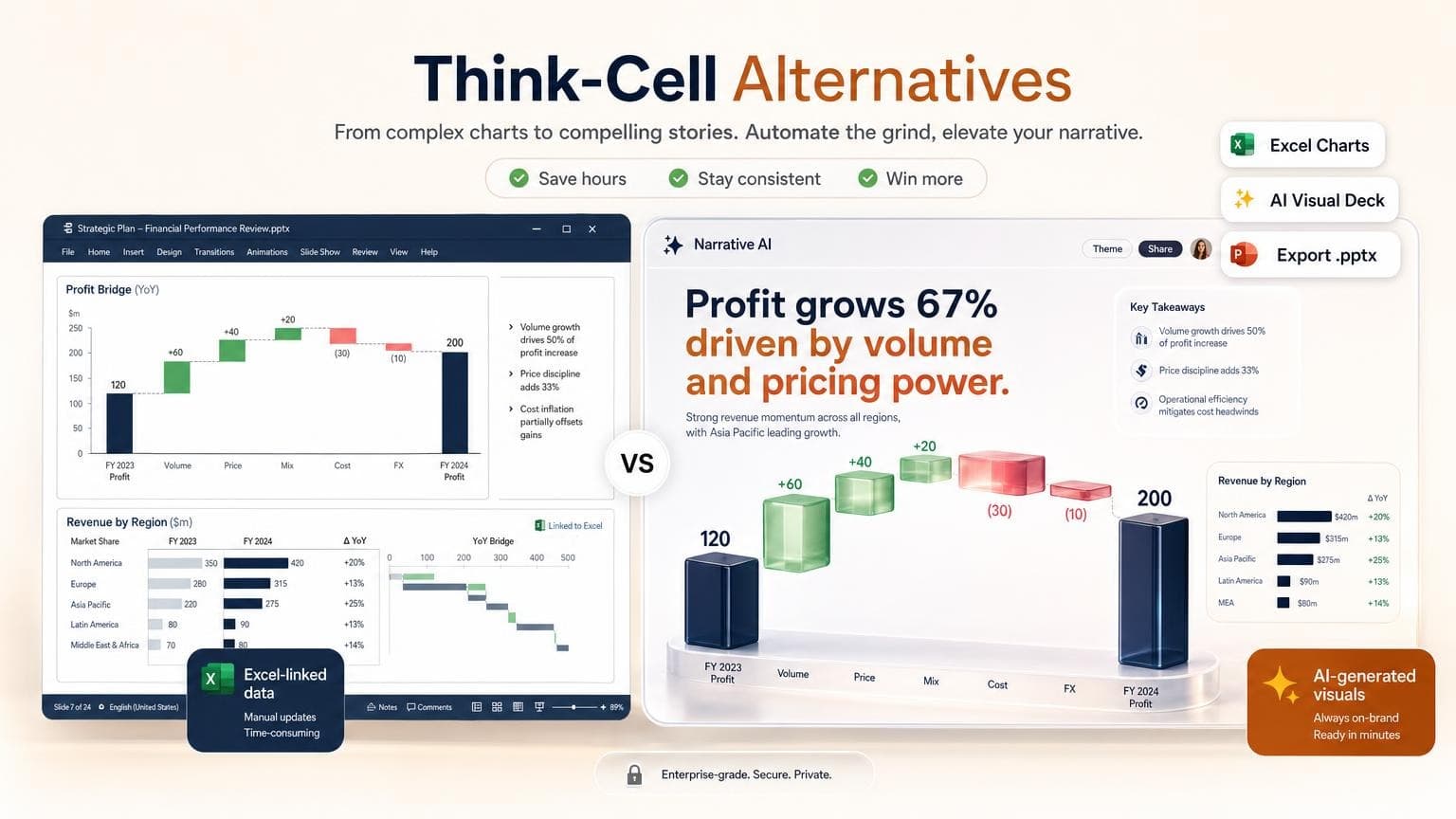
Consultants reach for Think-Cell when Excel numbers must become boardroom charts in minutes. Waterfall, Gantt, and Mekko layouts update when the spreadsheet changes. Nothing else matches that Excel-native speed for 80-slide strategy decks.
Most teams searching for Think-Cell alternatives want lower cost, AI that builds slides from a brief, or a workflow without a dedicated chart plugin. No single tool replaces every Think-Cell chart type. Pick based on whether your bottleneck is data-linked formatting or storytelling from existing material.
- Keep Think-Cell if Excel-linked Mekko, waterfall, and Gantt charts are non-negotiable and your firm already licenses it - Native PowerPoint charts cover many consulting visuals for free when you format charts by hand - Plus AI works inside PowerPoint or Google Slides when you need AI drafts without leaving the app - Beautiful.ai fits brand-consistent slide building with smart layout rules, not live Excel sync - GenPPT fits narrative decks from prompts or PDFs with designed chart slides. It does not link to Excel or update when a workbook changes - Budget 10–20 minutes to verify chart numbers after any AI or export workflow
Quick comparison: Think-Cell alternatives at a glance
For a wider AI presentation roundup, see Best AI PowerPoint Generators in 2026.
What Think-Cell actually does (and why consultants pay for it)
Think-Cell is a Windows PowerPoint add-in built for finance and strategy work. You connect Excel ranges to chart objects in PowerPoint. Change the workbook, refresh the slide, and waterfall bridges, stacked columns, and Gantt timelines stay aligned.
Where Think-Cell is still unmatched:
- Excel-linked updates without rebuilding charts by hand
- Specialized chart types: waterfall, Mekko/Marimekko, Gantt, scatter with labels, formatted to consulting standards
- Agenda and layout automation for long deck maintenance
- Speed for analysts who build the same chart patterns weekly
Limits:
- Quote-based pricing. Not self-serve. Firms budget hundreds per seat annually.
- Windows + PowerPoint only. No Mac-native add-in. No Google Slides path.
- No AI narrative. It formats data you already structured. It won't write the storyline.
- Steep onboarding. Repeat use unlocks speed; first runs feel opaque.
If you turn a model-driven Excel pack into 40 linked charts, Think-Cell remains the benchmark. The alternatives below solve different problems.
How we evaluated these Think-Cell alternatives
We compared tools against what consulting and corporate strategy teams ask when they search for replacements:
- Chart depth: Can it produce waterfall, Gantt, or Mekko-style visuals, or only standard bar/line/pie?
- Excel relationship: Live link, one-time import, or no spreadsheet path?
- PowerPoint fit: Native add-in, clean
.pptxexport, or web-only? - AI workflow: Prompt/document-to-deck vs slide building by hand
- Edit model after generation: Draggable chart objects vs full-slide images
- Pricing clarity: Public tiers vs enterprise quotes
We did not run a sponsored benchmark. We pulled pricing from official pages in August 2026.
When Think-Cell still wins
Stay on Think-Cell if:
- Your deck must refresh from Excel before every client meeting
- You build Mekko, waterfall, or Gantt charts to firm formatting standards
- Your organization already owns licenses and templates built around the add-in
- Compliance or IT policy requires native PowerPoint objects, not exported images
Consider alternatives when:
- You need first drafts from PDFs, memos, or prompts more than live model sync
- Your charts are simple (bar, line, pie) and native PowerPoint is fast enough
- Mac or Google Slides users need a workable path
- You want AI outline approval before pixels render
The best Think-Cell alternatives in 2026
1. Native PowerPoint charts: free built-in option
Best for: Teams that need editable chart objects in PowerPoint without another subscription.
Tradeoffs: You format everything by hand. Waterfall and Gantt exist in modern PowerPoint but take longer than Think-Cell. No Mekko out of the box. You approximate with stacked bars or build from templates.
How it works:
- Copy data from Excel and paste into PowerPoint's Edit Data in Excel sheet, or use Insert → Chart
- Pick chart type; use Chart Design and Format for consulting-style colors and labels
- For waterfalls, use PowerPoint's Waterfall chart type (Microsoft 365) or a trusted template
- Keep the linked workbook path consistent if you use Edit Links to Files
Good fit: Internal QBRs, simpler client decks, and teams with strong PowerPoint operators who do not need Mekko every week.
Not ideal if: You rebuild complex bridges daily or need one-click agenda maintenance across 100 slides.
2. Beautiful.ai: best for brand-consistent smart slides
Best for: Marketing, sales, and ops teams that build slide-by-slide with auto-formatting and brand kits.
Tradeoffs: You build slides one at a time with AI assist. Excel won't stay linked like Think-Cell. Chart variety suits business decks, not consulting-grade Mekko/Gantt.
Pricing (August 2026): Beautiful.ai lists Pro at $14.50/month billed annually or $45 month to month. Team plans start at $40/user/month billed annually.
Good fit: On-brand proposals, enablement decks, and recurring reports where layout consistency matters more than model-linked refreshes.
Not ideal if: Your workflow starts in Excel and ends with linked waterfall updates the night before the readout.
For more options in this category, see Best Beautiful.ai Alternatives.
3. GenPPT: best for visual narrative decks (not Excel sync)
Best for: Consultants and operators with summarized findings in a PDF, Word doc, brief, or prompt who need a designed deck with chart slides baked into full-slide visuals.
Tradeoffs: GenPPT won't replace Think-Cell for Excel-linked charts. It doesn't connect to a live workbook or refresh when cells change. GenPPT renders full-slide images with layout, typography, and charts baked in. You refine copy and visuals by regenerating slides in chat, then export .pptx. Check chart numbers against your source, same as any AI workflow.
Pricing (August 2026):
- Free: First deck free, no credit card (create a deck →)
- Growth: $19/month or $99/year after a $1 trial; watermark-free
.pptxand PDF export (details →)
Where GenPPT fits vs Think-Cell:
Typical GenPPT workflow:
- Upload a PDF board pack, paste a prompt, or add a link
- Approve the outline: edit titles, bullets, and metrics before design
- Pick a visual concept from a contact sheet
- Generate slides; regenerate any chart slide in chat if numbers or layout need adjustment
- Export PowerPoint or PDF
Good fit: Strategy readouts sourced from written reports, workshop decks, pitch narratives, and PDF-to-PowerPoint workflows where the input is already prose, not a live model.
Not ideal if: You need nightly Excel sync, native editable Mekko objects, or IT-mandated Think-Cell templates.
4. Plus AI: best AI add-in inside PowerPoint & Google Slides
Best for: Teams whose policy requires working inside PowerPoint or Google Slides and want AI to draft slides, rewrite bullets, and insert basic visuals without a separate web app.
Tradeoffs: Plus AI speeds up content and layout inside PowerPoint or Google Slides. It won't replicate Think-Cell's Excel-linked chart engine or Mekko/Gantt tooling. Use it to draft slides, not to refresh model-driven bridges.
Pricing (August 2026): Plus AI lists paid plans from roughly $10–15/month depending on billing, with a short trial.
Good fit: Corporate teams standardized on Microsoft 365 or Google Workspace who want AI drafts without export friction.
Not ideal if: Chart automation from Excel is the primary job. Plus AI won't replace Think-Cell's chart specialty.
See Plus AI in context in our AI PowerPoint generator comparison.
What about Power BI, ChatGPT, and other AI chart tools?
Some lists lump Think-Cell together with Power BI, ChatGPT Advanced Data Analysis, or standalone chart generators. Those tools help you explore and visualize data, then export an image or paste it into a slide.
Different job:
- Power BI: dashboards and deep analysis; paste exported visuals into PowerPoint
- ChatGPT / ADA: custom charts from uploads via prompts; paste into slides yourself
- Think-Cell: live charts inside PowerPoint tied to Excel
Reach for BI or chat tools when you need analysis. Keep Think-Cell when you need linked charts formatted at consulting speed. Use GenPPT when you need a designed deck from a written source.
How to choose the right Think-Cell alternative
Before you switch, decide: Must the chart update when Excel changes, or do you need a deck tomorrow from a report someone already wrote? The first path keeps Think-Cell (or PowerPoint linking). The second path fits AI deck builders.
Frequently asked questions
What is the best Think-Cell alternative in 2026?
No single tool replaces Think-Cell. Think-Cell still leads for Excel-linked consulting charts. Native PowerPoint is the free default for editable charts. Plus AI fits in-app AI inside PowerPoint. Beautiful.ai fits brand-consistent building by hand. GenPPT fits narrative decks from documents or prompts, not live Excel sync.
Can GenPPT replace Think-Cell?
Not for Excel-linked chart automation. GenPPT won't connect to workbooks or refresh charts when spreadsheet cells change. It works when you have a PDF, brief, or outline and want designed slides, including chart visuals, exported to PowerPoint. Treat AI-generated numbers like any draft: check them against your source.
Does GenPPT link to Excel?
No. GenPPT accepts prompts, PDFs, Word files, and links. You approve metrics in the outline from extracted or generated content. For live model-driven charts, use Think-Cell, PowerPoint's linked data, or paste updated values yourself.
Is Think-Cell worth it in 2026?
Worth it for teams that build many linked, specialized charts under tight deadlines and already know the tool. Harder to justify if your decks are mostly narrative, your charts are simple, or you rarely update numbers from Excel after the first build.
How much does Think-Cell cost?
Think-Cell uses quote-based licensing. Pricing is not listed publicly. Industry reports and user forums cite roughly $250+ per seat per year for commercial use, with firm-wide deals varying. Confirm with Think-Cell sales for your organization.
Can PowerPoint make waterfall charts without Think-Cell?
Yes. Microsoft 365 includes a Waterfall chart type. Formatting to consulting standards takes more work by hand than Think-Cell, but many teams use PowerPoint plus firm templates for simpler bridges.
Which alternative exports clean PowerPoint files?
Plus AI works natively in PowerPoint. Beautiful.ai and GenPPT export .pptx; GenPPT slides are full-slide images, not separate editable chart objects. Native PowerPoint produces editable chart objects.
Conclusion: match the tool to the bottleneck
Think-Cell owns one job: Excel data to consulting-grade charts inside PowerPoint, fast. Alternatives tackle different slices: AI narrative, in-app drafting, brand templates, free native charts.
If your deck starts from a written report and you want designed slides with outline control before render, try GenPPT. It won't sync your model overnight:
For broader AI tool comparisons, read Best AI PowerPoint Generators in 2026. For document uploads, see How to Turn a PDF into a PowerPoint with AI.